Gacha Life APK Download v1.1.14 for Android (2026)
There’s something special about creating your own anime characters. Picking the perfect hairstyle. Choosing that one outfit that just works. And then putting them into scenes where they tell stories you made up. That’s the magic of Gacha Life. And yeah, it’s still going strong in 2026.
Gacha Life APK is the Android package file for this popular anime character creator game by Lunime. The current version is 1.1.14, and while it hasn’t had major updates since August 2023, the game remains incredibly active. Over 100 million downloads. A solid 4.5 star rating from nearly 4 million reviews. People clearly love this thing.
In this guide, I’ll cover everything about Gacha Life APK. How to download it safely on Android. What features you get. How Studio Mode works. Whether it’s safe for kids. And some similar games you might enjoy. Let’s get into it.
What is Gacha Life?
Gacha Life is an anime game that lets you create and customize your own characters. It’s made by Lunime, the same developer behind Gacha Club and the newer Gacha Life 2. The whole point is simple. Design characters. Build scenes. Tell stories. No complicated rules or objectives.
Think of it like a digital dress-up game mixed with a storytelling tool. You start with a blank character. Then you pick from hundreds of options. Hairstyles. Outfits. Accessories. Weapons. Facial expressions. Poses. The customization goes deep. Really deep.

But here’s what makes it different from basic dress-up apps. You can actually do stuff with your characters. Studio Mode lets you place them in scenes. Add backgrounds. Write dialogue. Create little movies or comics. Kids spend hours making stories about their original characters.
The game falls into what people call the gacha game category. That means there’s a random reward system. You earn gems and do “gacha pulls” to get gifts and items. It’s like opening mystery boxes. Sometimes you get common stuff. Sometimes you hit something rare. That randomness keeps people coming back.
And the numbers tell the story. Over 100 million downloads on the Google Play Store. A 4.5 star rating from 3.86 million reviews. For a game that hasn’t had a major update in years, those stats are impressive. The fanbase keeps it alive through user-generated content and community creations.
Why does Gacha Life remain so popular in 2026? A few reasons. First, it’s lightweight. Runs on almost any Android device. Second, it works offline. No internet needed after you install it. Third, the creative freedom is unmatched. Kids can make literally anything they imagine.
The anime-style graphics attract a specific audience. If your kid loves anime, they’ll probably love this. The art style is cute and colorful. Characters have those big expressive eyes. Everything feels very Japanese animation inspired.
Lunime built something that resonates with creative kids. No violence. No pressure to win. Just pure creation. Design your characters. Tell your stories. Share with friends if you want. That simplicity is the secret sauce.
Gacha Life APK Latest Version 1.1.14
Version 1.1.14 is the current release, last updated on August 15, 2023. Yeah, that’s a while ago. But don’t let the date fool you. The game runs perfectly fine on modern devices. Lunime pushed a compatibility update to ensure it works on newer Android phones and tablets.
The update notes were pretty simple. “Gacha Life is now available on all Android devices!” No fancy new features. No dramatic changes. Just making sure everyone can still play. And honestly? That’s all it needed.
Here’s the thing about Gacha Life. It reached a point where it just works. The core features are solid. Character customization is extensive. Studio Mode functions properly. Mini-games are fun. There’s nothing broken that needs fixing. So Lunime moved their focus to newer projects.
The game sits comfortably on the Google Play Store with no signs of disappearing. Some apps get abandoned and eventually removed. Not this one. It’s still actively available. Still getting downloads every day. Still maintaining that high rating.
Now, about the elephant in the room. Gacha Life 2 exists. It’s the sequel that started rolling out in late 2025. Version 0.95 or 0.96 was the latest around that time. The sequel has online features. Bigger worlds. Fresh updates regularly. If you want the newest experience, that’s where the action is.
But here’s why the original still matters. It’s stable. Completed. Works offline without issues. Some players prefer the classic version. They know it inside and out. Their favorite characters live there. Starting over in a sequel isn’t always appealing.
The lack of updates actually benefits some users. No surprise changes to learn. No features getting removed or modified. What you download today is exactly what it’ll be tomorrow. There’s comfort in that consistency.
Will Lunime ever update Gacha Life again? Probably not in any major way. Their attention is on Gacha Life 2 and other projects. But maintenance updates for compatibility might still happen. They clearly want the game to remain playable.
For anyone wondering if they should still download Gacha Life in 2026, the answer is yes. It works. It’s fun. It’s free. The age doesn’t matter when the experience holds up. Plenty of classic games stay relevant way longer than their update dates suggest.
Gacha Life APK File Size and Requirements
The Gacha Life APK file size is around 99-104 MB depending on your source. That’s surprisingly small for what you get. Most games with this much content take up way more space. Lunime kept things optimized.
Let me put that in perspective. Newer games in the same genre often hit 500 MB or more. Some push past a gigabyte. Gacha Life gives you hundreds of customization options, multiple game modes, and mini-games in under 105 MB. Pretty efficient.
The Android requirement is version 5.0 or higher. That’s Lollipop, which came out back in 2014. So basically any Android device from the last decade can run this game. Your old tablet sitting in a drawer? Probably works. Your kid’s budget phone? Should be fine.
Here’s what you need to play:
- Android 5.0 or newer
- About 150 MB of free storage to be safe
- No constant internet connection required
- Works on phones and tablets
Device compatibility is excellent across the board. The game was designed to run on older hardware. It doesn’t demand powerful processors or tons of RAM. This accessibility is part of why it reached 100 million downloads. Almost everyone can play it.
Tablets offer a better experience if you have one available. The bigger screen makes character customization easier. You can see more details. Tapping small buttons becomes less frustrating. But phones work totally fine too.
Budget devices handle Gacha Life without problems. No lag during gameplay. No crashes from memory issues. The lightweight design means even entry-level phones run it smoothly. Parents don’t need to buy expensive devices for their kids to enjoy this.
Storage management is simple with this game. Install it once and you’re done. No massive additional downloads afterward. No constant updates eating up space. What you see in the file size is basically what you get.
One thing to note. If you’ve played before and reinstall, your old data might not transfer automatically. Progress saves locally on your device. Switching phones means potentially starting fresh. Keep that in mind before uninstalling.
The small file size also means quick downloads. Even on slower internet connections, you’ll have the game installed within minutes. No waiting around for hours. Download, install, and start creating characters right away.
For families managing multiple devices with limited storage, Gacha Life is refreshingly compact. It leaves room for other apps without forcing difficult choices about what to delete.
How to Download Gacha Life APK on Android
The safest way to download Gacha Life APK is through the Google Play Store. I know that seems obvious. But it’s worth emphasizing. Official sources protect your device from potential problems.
Here’s the exact process:
- Open the Google Play Store on your Android device
- Search for “Gacha Life” in the search bar
- Find the official app by Lunime
- Tap the Install button
- Wait for the download to finish
That’s really it. Simple and straightforward. The app handles everything automatically. Downloads the APK file. Installs it properly. Sets up all the necessary files. You don’t need to do anything technical.
After installation, the game is ready to play immediately. Open it up and start creating characters. No account creation required. No login screens. No waiting for additional content to download. Just jump straight into the fun.
But what if the Play Store isn’t working for you? Maybe your device doesn’t have Google Play Services. Maybe there’s some regional restriction. These situations happen occasionally.
For manual APK installation, you’ll need to adjust some settings first. Go to your device Settings. Find Security or Privacy. Look for the option to enable Unknown Sources. This allows installing apps from outside the official store.
After enabling that setting, you can install the APK file directly. Make sure you get it from a trustworthy place. Sketchy sources often bundle malware with popular games. Not worth the risk to save a little hassle.
Here’s a pro tip many people miss. After installing, clear the app cache if you experience any weirdness. Go to Settings, then Apps, find Gacha Life, and tap Clear Cache. This solves random glitches sometimes.
Some quick notes about the installation:
- The game requires about 100 MB of download
- Installation takes just a minute or two
- No additional files needed afterward
- Works immediately after setup
Parents should probably supervise the initial download. Make sure kids are getting the official version. Verify it’s actually from Lunime. The real app has that 100 million download count and millions of reviews. Fake versions exist and you want to avoid those.
Once installed, the game updates automatically through the Play Store when Lunime releases patches. You don’t need to manually check for updates. The system handles it. Though as mentioned, updates are rare at this point.
Gacha Life Character Customization Features
Gacha Life offers hundreds of options for creating unique anime characters. This is honestly where the game shines brightest. The depth of customization keeps players engaged for hours. Days even. Some people never stop tweaking their characters.
Let’s break down what you can actually change. Hairstyles come in countless varieties. Short. Long. Spiky. Flowing. Every anime trope you can imagine. Colors range across the entire rainbow. Want purple hair with blue tips? Go for it. The game doesn’t limit your creativity.
Outfits take customization even further. Shirts, pants, dresses, skirts, jackets, shoes. Each category has tons of choices. Mix and match whatever you want. Create casual looks. Formal wear. Fantasy costumes. School uniforms. The combinations are basically endless.
Then you’ve got accessories. Hats, glasses, masks, wings, tails, horns. Weapons too, though they’re just for looks. Swords, staffs, bows, guitars. These items add personality to your characters. Transform them from basic to memorable.
Facial features deserve their own mention. Eyes come in many shapes and colors. Eyebrows affect expression dramatically. Mouths can smile, frown, smirk. Blushes add cuteness. Scars add edge. Every tiny detail changes how your character feels.
The pose system lets characters stand differently. Confident poses. Shy poses. Action poses. Sitting. Jumping. Fighting stances. Combined with expressions, you can convey specific emotions and personalities just through positioning.
Character slots allow saving multiple creations. You’re not limited to one or two characters. Create entire casts for your stories. Families. Friend groups. Rivals. The game gives you room to build whole worlds of original characters.
Here’s what really gets people hooked. There’s no right or wrong way to design characters. No meta builds to follow. No optimal choices. Just pure creative expression. Whatever looks cool to you is the correct answer.
The anime-style graphics make everything appealing. Even simple designs look polished. The art style carries a lot of weight. Beginners create decent-looking characters right away. Experience just means more refined visions.
Some players spend more time customizing than actually using Studio Mode. And that’s completely valid. The character creator is satisfying on its own. Endlessly adjusting details. Trying new combinations. Saving favorites. It’s a creative outlet that doesn’t require storytelling skills.
Gacha Life Studio Mode Explained
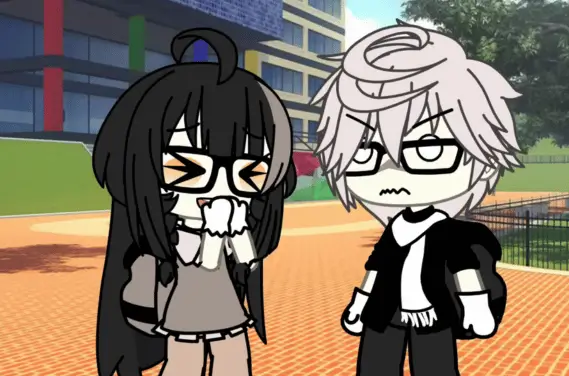
Studio Mode is where you create scenes and tell stories with your characters. Think of it as a digital stage where your anime creations come to life. You set everything up. Backgrounds. Character positions. Dialogue. Then capture the moment.
The basic process works like this. First, you select a background. Indoor locations, outdoor scenery, fantasy worlds, everyday places. The variety covers most storytelling needs. Pick something that fits your scene.
Next, you add characters. Pull from your saved creations or use presets. Position them wherever you want on screen. Front, back, left, right. Layer them for depth. The placement affects how scenes feel.
Then comes the dialogue. Text boxes let characters speak. You write what they say. Conversations unfold however you imagine them. Drama. Comedy. Romance. Action. The genre depends entirely on your vision.
Expressions matter hugely in Studio Mode. Change how characters look for each scene. Happy faces for celebrations. Sad eyes for emotional moments. Angry expressions for conflicts. These shifts bring static images to life.
Poses work alongside expressions. A character might cross their arms while looking annoyed. Another might reach out while appearing concerned. Combining poses with expressions creates convincing emotional moments.
Many players use Studio Mode to create comics. Scene by scene, they build stories. Screenshot each setup. Arrange them in order. Share online if they want. Some creators produce entire series this way.
The storytelling potential really has no limits. Slice of life stories about school friends. Fantasy adventures with magic and monsters. Mystery plots with twists and reveals. Whatever genre appeals to you works.
Here’s something cool about the community. User-generated content from Studio Mode fills the internet. People share their creations everywhere. It inspired a whole culture of Gacha content. Videos. Comics. Art. All stemming from this simple scene creator.
You don’t need artistic skills to make something decent. The game provides everything. Characters are already designed. Backgrounds are already drawn. You just arrange pieces and add words. Accessibility opens storytelling to everyone.
Some creators treat it seriously. Planning stories in advance. Writing scripts. Designing characters specifically for roles. Others just play around casually. Making silly scenes for fun. Both approaches are equally valid.
Studio Mode is why Gacha Life stuck around for so long. Character creation alone might get boring eventually. But storytelling has infinite replay value. There’s always another story to tell. Another scene to create. Another idea to try.
Gacha Life Life Mode and Mini-Games
Life Mode lets you interact with NPCs and play fun mini-games throughout different areas. This is the part of Gacha Life that feels most like an actual game. You move around. Talk to characters. Discover things. Play quick challenges.
The basic setup has you visiting various locations. Each area has NPCs standing around. Walk up to them and chat. Their dialogue is usually funny or quirky. Some give you gifts. Others just say random stuff. It adds personality to the world.
Different areas have different vibes. Some locations feel like towns. Others are more fantasy themed. Each one offers unique characters to meet. Exploring everything takes time. But finding all the hidden details is part of the fun.
Now let’s talk about those mini-games. They’re scattered throughout Life Mode. Simple little challenges that earn you rewards. Nothing too complicated. Just quick bursts of gameplay between conversations.
Duck & Dodge is one popular mini-game. Objects fly at your character. You tap to dodge them. Survive as long as possible. The longer you last, the better your score. It’s simple but addictive in that “one more try” way.
Phantom’s Remix is another one players enjoy. It’s a rhythm game where you tap along to music. Notes come down the screen. Hit them at the right time. Miss too many and you fail. Pretty standard rhythm game stuff but executed well.
These mini-games serve a purpose beyond entertainment. They reward you with gems. Gems let you do gacha pulls. Those pulls give random items and gifts. It’s a nice gameplay loop. Play games, earn currency, get rewards.
The gacha pull system itself is satisfying. That anticipation before results appear. The joy when something rare drops. The mild disappointment when it’s common stuff. These emotions keep people pulling again and again.
Life Mode also helps you unlock items for character customization. Some outfits and accessories only come from playing through this mode. So even if you mainly care about Studio Mode, Life Mode has practical benefits.
For kids, Life Mode provides more structured entertainment. Not everyone wants pure creative tools. Sometimes you just want to play something. Move around. Complete tasks. Feel like you’re progressing. Life Mode delivers that experience.
The mini-games work great for short play sessions too. Got five minutes? Play a quick round of Duck & Dodge. Don’t have time for elaborate story creation? Just hang out in Life Mode. It’s flexible content that adapts to your schedule.
Can You Play Gacha Life Offline?
Yes, you can play Gacha Life completely offline after installation. This is honestly one of the best features. No internet required. No WiFi hunting. Just open the game and play wherever you are.
Once everything downloads initially, the game runs from local storage. All the character options exist on your device. Studio Mode works without connection. Life Mode and mini-games function normally. Everything operates independently from the internet.
What works in offline mode? Let me list it out:
- Full character customization
- All saved character slots
- Complete Studio Mode access
- Life Mode exploration
- Every mini-game
- Gacha pulls with earned gems
Basically, the entire game works offline. There’s no stripped-down version when you’re disconnected. You get the full experience regardless of internet status.
This makes Gacha Life perfect for travel. Long car rides become creative sessions. Airplane mode doesn’t stop the fun. Waiting rooms turn into character design time. Anywhere you have your device, you can play.
Parents especially appreciate this feature. No worrying about data usage. No surprise charges from mobile connections. Hand the tablet to your kid and let them play. The game won’t try connecting to anything.
The offline capability also means no external influences. Nobody sending messages. No online interactions with strangers. Pure single-player experience. Your kid plays alone with their imagination. Nothing more, nothing less.
Some games claim offline support but actually require check-ins. They’ll stop working after a few days disconnected. Gacha Life doesn’t pull that trick. Stay offline for weeks and everything still works fine.
Updates are the only thing requiring internet. If Lunime ever releases a new patch, you’d need to connect for that download. But since updates are rare now, this rarely matters. Most people can stay permanently offline without missing anything.
The offline design shows respect for players. Lunime didn’t force online requirements to push purchases or track behavior. They built something that works independently. That approach feels increasingly rare in mobile gaming.
For families managing screen time, offline mode helps with boundaries. You can disable internet access on a device entirely. The kid still enjoys Gacha Life without access to anything else online. It’s a controlled entertainment option.
Is Gacha Life APK Safe for Kids?
Gacha Life has an Everyone age rating and is generally safe for children. The game itself contains no inappropriate content. It’s designed with younger players in mind. Cute graphics. Simple gameplay. Creative focus.
Let me break down the safety aspects. The content within the game stays kid-friendly. Characters are cartoon anime style. No realistic violence. No scary imagery. Nothing that should disturb young children.
The Everyone rating means the ESRB reviewed it and found it appropriate for all ages. That’s the official assessment. Parents can feel reasonably confident about what’s in the base game itself.
In-app purchases exist but require confirmation. Kids can’t accidentally buy things without parental approval. Set up password protection on purchases and you’re covered. The game offers ads and some extras for money, but the core experience is free.
Here’s where things get a bit more nuanced though. The creative tools allow players to make anything. Lunime can’t control what users create. Some older players have used the game to make inappropriate content and shared it online.
This doesn’t mean the game itself is bad. It means parental awareness matters. If your child shares or searches for Gacha content online, that’s where they might encounter inappropriate user-generated stuff. The game in isolation is perfectly safe.
For younger kids playing purely offline, concerns are minimal. They create characters. They build scenes. They play mini-games. Everything stays within the safe bubble Lunime designed.
Older kids who browse online Gacha communities need more supervision. Some content creators push boundaries. Not everyone making Gacha videos or images keeps things appropriate. Know what your child is viewing beyond just playing the game.
The single-player nature adds safety. No chat features. No online multiplayer. No strangers sending messages. Your kid interacts only with NPCs that Lunime created. No unexpected human contact.
Here’s my honest take. The game itself is safe. The broader online community around it requires parental attention. Playing the game alone is totally fine. Diving deep into fan content online needs oversight.
Set boundaries that make sense for your family. Maybe it’s playing offline only. Maybe it’s supervised online sharing. Maybe it’s full freedom for older responsible kids. You know your child best.
Gacha Life vs Gacha Club Comparison
Gacha Club is the newer game with more features, while Gacha Life remains a beloved classic. Both come from the same developer, Lunime. Both offer character creation and storytelling. But they’re different experiences.
Let’s start with the basics. Gacha Life came first. It established the formula that millions fell in love with. Character customization, Studio Mode, Life Mode, mini-games. The foundation that built a massive community.
Gacha Club launched later with significant upgrades. More customization options. Improved graphics. Additional features. It’s essentially Gacha Life expanded and refined. The sequel treatment.
Character creation differences are noticeable. Gacha Club offers more clothing items. More hairstyles. More accessories. More everything. If pure customization depth matters most, Gacha Club wins that comparison.
Studio Mode evolved between games too. Gacha Club has more backgrounds. Better positioning tools. Additional effects. Scene creation became more powerful. Storytelling potential increased.
But here’s why Gacha Life still matters. It’s simpler. Less overwhelming for new players. Easier to learn and enjoy quickly. Sometimes more options means more confusion. Gacha Life stays accessible.
The file sizes reflect this difference. Gacha Life is around 100 MB. Gacha Club is significantly larger. For devices with limited storage, the original remains more practical.
Both games work offline. Both are free with optional purchases. Both target the same creative audience. The core appeal remains consistent across both titles.
Some players maintain both on their devices. Different moods call for different games. Want quick simple creation? Gacha Life. Want deep detailed customization? Gacha Club. Having options is nice.
The community split somewhat between games. Some creators moved entirely to Gacha Club. Others stuck with Gacha Life for nostalgia. A few work in both regularly. Personal preference guides most decisions.
Which should you download? Honestly, trying both makes sense. They’re free. Low commitment to test them. Your preference becomes clear after a few sessions with each. No wrong answer exists.
For complete beginners, Gacha Life might be the better starting point. Learn the basics without overwhelming options. Then move to Gacha Club when you want more. It’s a natural progression.
Games Similar to Gacha Life
If you enjoy Gacha Life, several other games offer similar creative experiences. The market has options for anime character creation and sandbox storytelling. Here are some worth checking out.
Avatar World APK by Pazu Games is a great alternative. Same creative freedom concept. Different art style. Kids design characters, build homes, and create stories. It targets a slightly younger audience with simpler controls. The sandbox gameplay feels familiar if you like Gacha Life’s approach.
Gacha Club is the obvious next step. Same developer. Same core concept. More features and options. If you want the evolved version of what Gacha Life offers, that’s where to look. Most Gacha Life fans eventually try it.
Gacha Life 2 is currently in development. The latest sequel with online features and expanded worlds. It’s newer and receiving active updates. For those wanting the freshest content from Lunime, this is the cutting edge.
Character creation games exist beyond the Gacha series too. Some focus purely on designing anime avatars. Others add different gameplay elements around that core. The dress-up style genre has many entries.
Anime-inspired games for mobile span various types. Some are role-playing games with character customization elements. Others are pure creators without game mechanics. Your specific preferences narrow down the best fits.
For kids who love the storytelling aspect specifically, apps designed for comic creation might appeal. They offer scene building with different artistic approaches. Less anime focused but similar creative output.
What makes Gacha Life special is the combination. Character creation plus storytelling tools plus mini-games plus that specific anime aesthetic. Finding exact replicas is tough. But pieces of that formula exist in many apps.
The creative sandbox category keeps growing. Developers see the appeal of player-driven content. Expect more options to appear over time. The genre has proven its audience exists and keeps engaging.
Try a few alternatives to discover what you like. Each game emphasizes different aspects. Some nail character design but lack storytelling tools. Others offer great scene creation with limited customization. Finding your perfect fit takes some experimentation.